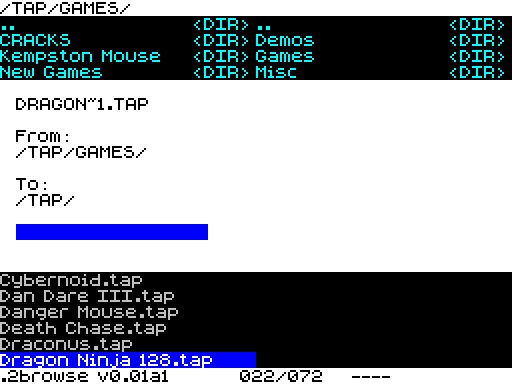
Notice: It requires a divMMC compatible device with at least 128k of memory.
It also requires an existing installation of Bob Fossils long filename browser. https://spectrumcomputing.co.uk/forums/ … amp;t=2553
2browse file manager for esxDOS
bob_fossil » Sat Dec 25, 2021 7:25 pm
Introducing, 2browse - a twin pane file manager for esxDOS based on my long filename browser code.
This is an early work-in-progress so don't use this for anything mission critical as it may chew up or corrupt your files. It requires a divMMC compatible device with at least 128k of memory. It also requires an existing installation of my long filename browser.
Copy the contents of the 2browse BIN folder to the /BIN folder on your SD Card. To run, from BASIC enter:
.2browseor if you want to start browsing from a specific folder, in this case the /BIN folder:
.2browse /bin2browse supports browser plugins and the majority of keys from the long filename browser with the following additions:
Extended Mode - Swap between windows
Caps Shift + M - Move selected file to other window
Caps Shift + C - Copy selected file to other windowThe following browser keys are not supported in 2browse:
Caps Shift + S - Save snapshot
Caps Shift + K - Poke
Caps Shift + L - External command
Caps Shift + N - Default NMI
Symbol Shift + F - Toggle full-screen file browserKnown issues:
All file operations (Move, Copy, New Folder, Rename) are limited to 8.3 filenames.
If you copy a file and then perform the same copy again, you aren't prompted to overwrite or abort the copy. You just get a cryptic error message displayed.
2browse uses the BROWSE.CFG and font file from the long filename browser. Any changes you make to those will be carried over into 2browse.
Copy and move operations cannot be aborted once started.Download here: http://www.thefossilrecord.co.uk/wp-con … _001-1.zip